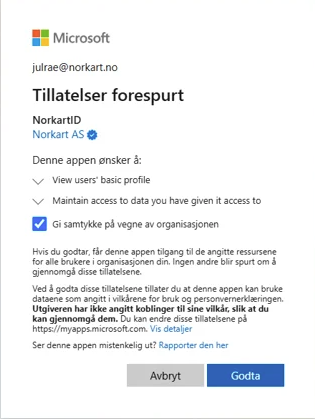
Who can provide approval?
An administrator with the appropriate rights in Entra ID must perform this approval. This typically requires one of the following roles
- Global Administrator
- Privileged Role Administrator
- Cloud Application Administrator
- Application Administrator
How to approve the application?
The easiest way to approve the application is to use the link below
Replace {organization} with your Entra Tenant ID or domain:
https://login.microsoftonline.com/{organization}/adminconsent?client_id=2ff908b0-09d5-41a3-a034-4a906ee722ce
What information is shared?
By approving the application, you allow NorkartID to use Entra ID for user identification. This gives NorkartID access to the following information:
- email: Allows the application to read the user's email address.
- openid: Allows the application to use the Entra ID account for login.
- profile: Allows the application to read basic info such as name, username, and profile picture.
- offline_access: Allows the application to keep the user signed in.
When you click Accept, you consent to share this information with NorkartID. We recommend checking the box "Consent on behalf of your organization". This ensures that new users can log in directly without needing to provide individual approval.